
Using Spinzo's Side Panel

Spinzo's side panel allows for buyers to stay on your web page and complete their transaction. Only two lines of code are needed to make this happen.
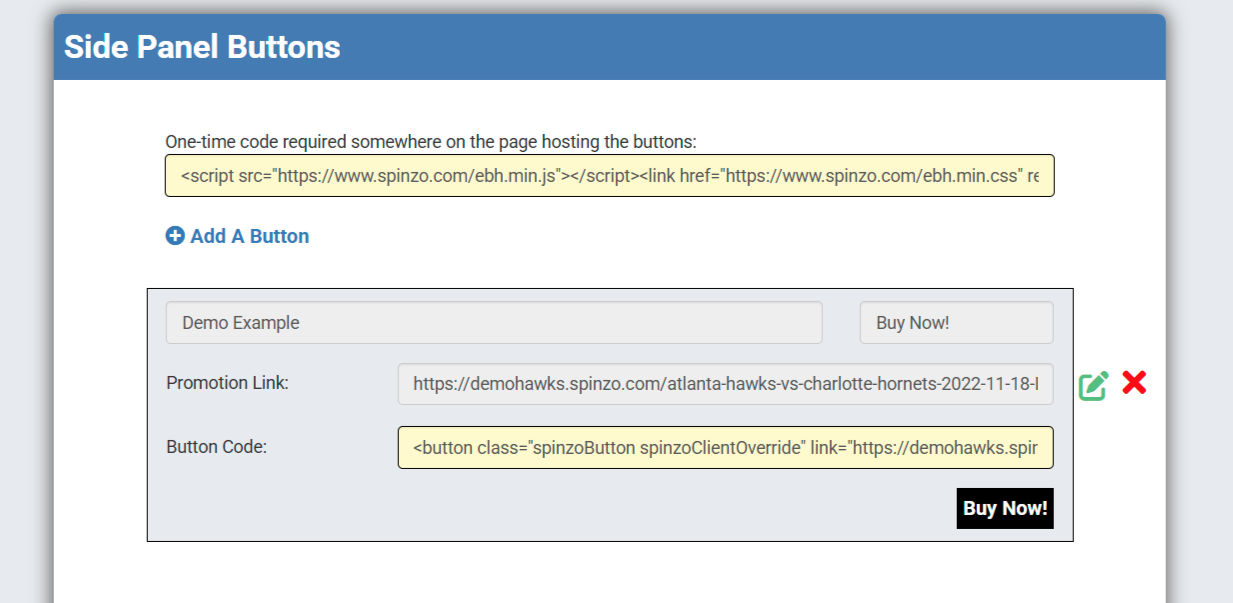
One Time Code: Go to the dashboard, choose Side Panel Buttons. At the top there is a line of one time code that needs to go on the page hosting the buttons. Place that line of code.
Creating Buttons: Click Add a Button and provide a descriptive name for the button. Choose the text for the button and past the promotion link.
Instantly the button line of code will be generated and that can be placed where the button is desired on the web page.
The promotion link can be to any where in the buy flow, group listing page, sales event page or check out screen for example.
The Spinzo side panel can be used on any web page, often teams will use it on theme night or group promotion pages.
Here is a demo example of the side panel used in a premium use case: Hornets Suites Click Reserve Today to see the side panel in action.